Explore the build at any moment.
Play the sequence, pause at a key stage or move straight to an activity. See how the structure develops alongside the construction programme.
4D construction sequencing. Your programme, brought to life.
Talk to us about BuildFrame ↗| Activity / WBS | Dur. | Start | Finish | |
|---|---|---|---|---|
| 1d | 05 Jan | 06 Jan | ||
| 1d | 05 Jan | 06 Jan | ||
| 3d | 06 Jan | 09 Jan | ||
| 1d | 06 Jan | 07 Jan | ||
| 1d | 07 Jan | 08 Jan | ||
| 1d | 08 Jan | 09 Jan | ||
| 4d | 09 Jan | 13 Jan | ||
| 4d | 09 Jan | 13 Jan | ||
| 27d | 13 Jan | 09 Feb | ||
| 14d | 13 Jan | 27 Jan | ||
| 3d | 27 Jan | 30 Jan | ||
| 10d | 30 Jan | 09 Feb | ||
| 10d | 09 Feb | 19 Feb | ||
| 7d | 09 Feb | 16 Feb | ||
| 3d | 16 Feb | 19 Feb | ||
| 56d | 19 Feb | 16 Apr | ||
| 14d | 19 Feb | 05 Mar | ||
| 14d | 05 Mar | 19 Mar | ||
| 14d | 19 Mar | 02 Apr | ||
| 14d | 02 Apr | 16 Apr | ||
| 25d | 16 Apr | 11 May | ||
| 14d | 16 Apr | 30 Apr | ||
| 10d | 27 Apr | 07 May | ||
| 4d | 07 May | 11 May | ||
| 14d | 11 May | 25 May | ||
| 7d | 11 May | 18 May | ||
| 6d | 18 May | 24 May | ||
| 1d | 24 May | 25 May | ||
| — | 25 May | 25 May |
Select an activity to visit it in the model. Drag the date ruler to explore the programme. Swipe across the table for the Gantt chart.
Drag to orbit · right-drag to pan · scroll or pinch to zoom
The existing site and road, before establishment or construction begins.
Explore seven construction stages, from site establishment to completion.
Discover BuildFrame ↓Explore the BuildFrame desktop workspace. A detailed view of the build, the model hierarchy and the construction programme, together in one place.
Bring BuildFrame to your project ↗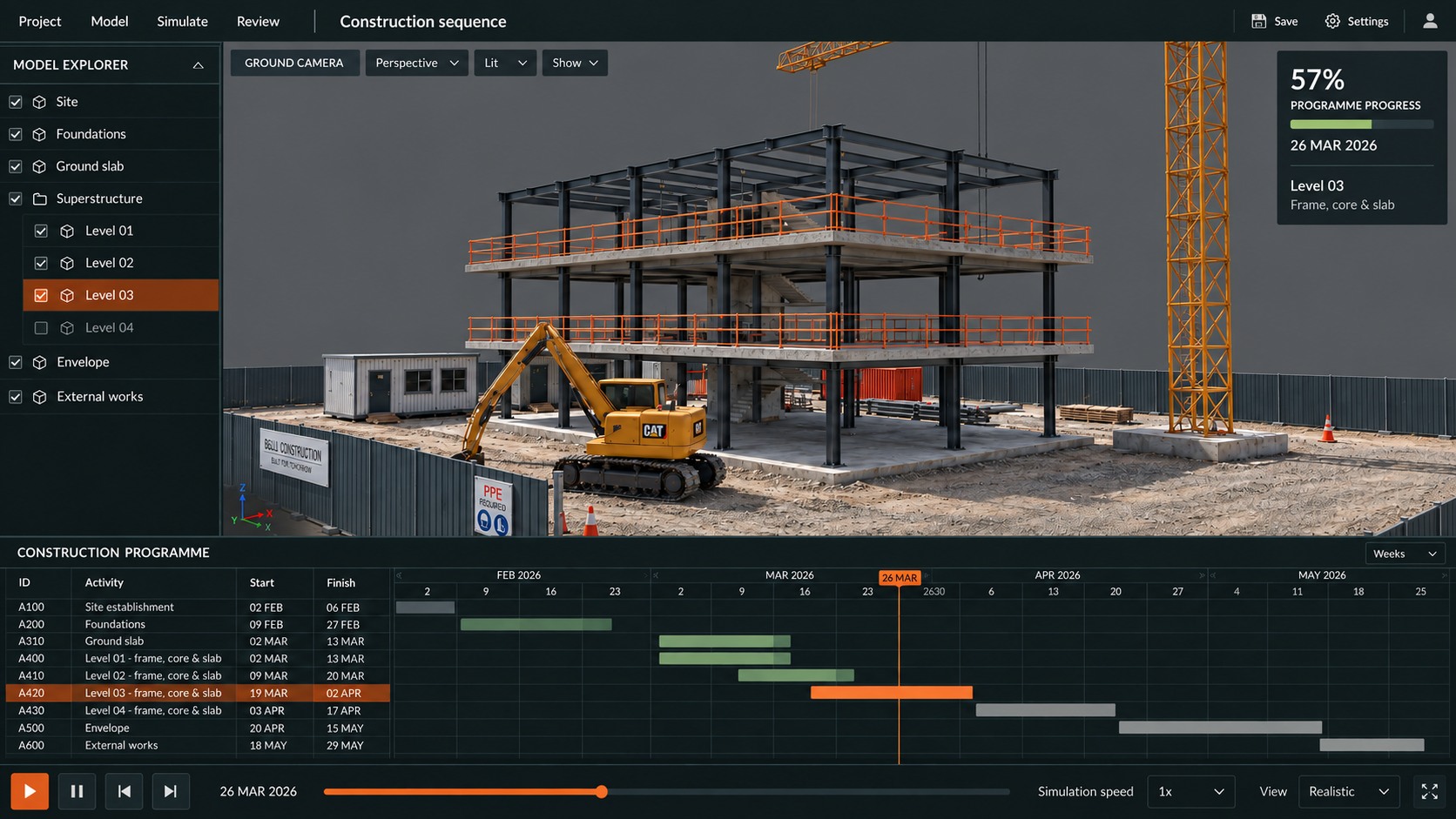
A construction programme tells you when. A project model shows you where. BuildFrame brings them together, so your team can explore how the work takes shape over time.
Explore BuildFrame in your browser, then work with us to configure the desktop application around your project, data and review process.
Play the sequence, pause at a key stage or move straight to an activity. See how the structure develops alongside the construction programme.
Move freely around the site, switch to a ground-level view or look down on the whole project. Review the work from the viewpoint that answers the question.
Include site establishment, excavation, temporary works and external works in the sequence. Show when supporting elements arrive and when they leave the site.
The useful connection is between an activity, its dates and the model elements it represents. We work with you to define those relationships and turn the data into an explorable construction sequence.
Bring your project model alongside programme data from Primavera or sequence data from Navisworks. Activity IDs, names, start and finish dates provide the basis for the sequence.
Geometry + activity dataMap activities to model elements or groups, such as a floor, zone or work package. Define what appears, changes or is removed as each activity progresses.
Activity → model elementsMove through dates with the team and inspect what is happening on site. Use the sequence to discuss handovers, work areas, access and temporary works.
Programme → spatial reviewAgree how programme revisions and model changes will be brought into your bespoke application. Retaining consistent activity and element IDs helps preserve those connections.
An update process for your projectA420 Level 03 · frame, core & slab
One programme activity, connected to the third-level construction sequence.
Work with models from a broad range of Autodesk applications and sequence data from Primavera and Navisworks. We connect those inputs through a workflow configured for your project.
Autodesk applications
Bring geometry from your Autodesk modelling workflow into an interactive construction environment. We confirm the model preparation and export path against your source application and project structure.
Primavera
Use programme activities and dates to drive the construction sequence. Connect the planner’s activity structure to the elements and work packages being built.
Navisworks
Use existing construction sequence data as an input to the desktop application. We work through the activity and model relationships to bring that sequence into the interactive review.
We confirm the export format, required fields and update process with a sample of your project data.
Use the sequence in tender presentations, methodology reviews, planning workshops and stakeholder briefings.
Give clients and delivery teams a visible account of how the project will be built. Move from a line in a programme to the work it describes.
Discuss whether trades have space to work, how access changes and what needs to be in place for the next stage. Bring those questions into planning reviews.
Let site teams, planners and stakeholders explore the same sequence. A shared visual reference makes specialist programme information easier to discuss.
Shape the interface, level of detail and data workflow around your team. Focus on the activities and decisions that matter to the job.